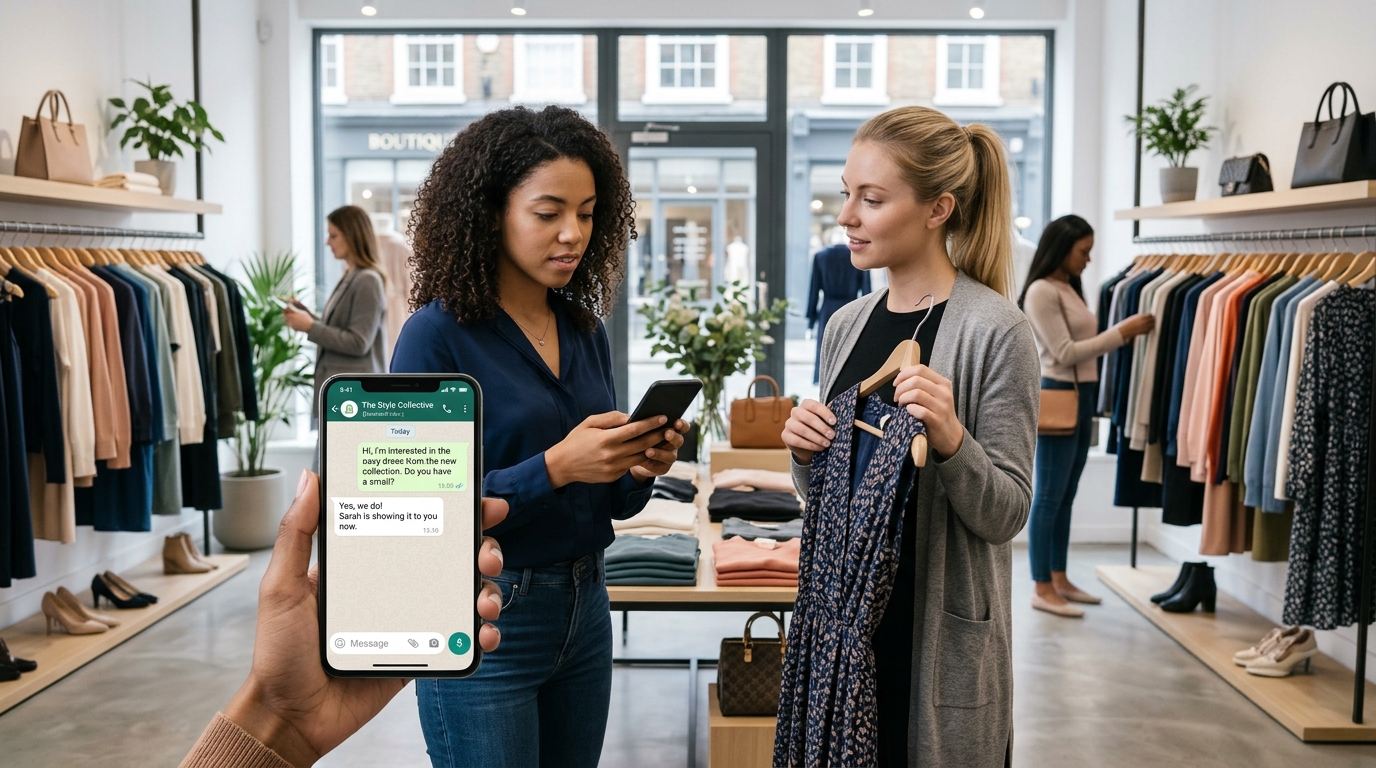
Businesses are constantly looking for effective ways to reach potential customers, generate leads, and increase sales. Social media advertising has become an important part of digital marketing, but getting people to visit a website or complete a traditional contact form does not always produce the desired results. Many customers prefer direct communication before making a purchasing decision.
This is where Click-to-WhatsApp ads become useful.
Click-to-WhatsApp ads allow businesses to advertise on platforms such as Facebook and Instagram and direct interested users into a WhatsApp conversation. Instead of sending potential customers to a website, the advertisement opens a chat with the business, where customers can ask questions, request prices, explore products, and receive assistance.
This advertising method can be particularly valuable for businesses that depend on conversations to generate sales, including online stores, real estate agencies, travel companies, educational institutions, service providers, and local retailers.
However, running successful WhatsApp advertising campaigns requires more than creating an advertisement and setting a budget. Businesses need to understand advertising costs, campaign setup, audience targeting, creative design, customer response management, and performance tracking.
This guide explains how Click-to-WhatsApp ads work, how much they cost, how to set them up, and which marketing strategies can help businesses generate better results.
What Are Click-to-WhatsApp Ads?
Click-to-WhatsApp ads are paid advertisements that allow people to start a WhatsApp conversation with a business directly from an advertisement.
These advertisements commonly appear on Facebook and Instagram. When someone clicks the call-to-action button, such as Send Message or WhatsApp, the platform opens a conversation with the business’s connected WhatsApp account.
Instead of requiring users to visit a website, search for contact information, or complete a lengthy form, the advertisement gives them a direct way to communicate with the company.
For example, a furniture store can advertise a new sofa collection on Instagram. When a potential customer clicks the advertisement, WhatsApp opens with a conversation where the customer can ask about prices, available colors, delivery options, and payment methods.
How Do Click-to-WhatsApp Ads Work?
The process is relatively simple.
- A business creates an advertisement through Meta’s advertising tools.
- The business selects WhatsApp as the messaging destination.
- The advertisement appears to a selected audience on eligible placements.
- A potential customer clicks the advertisement.
- WhatsApp opens a conversation with the business.
- The customer sends a message or selects a suggested question.
- The business responds and attempts to convert the inquiry into a lead, booking, or sale.
The customer can then continue the conversation with a sales representative, customer support agent, or automated chatbot.
Where Can Click-to-WhatsApp Ads Appear?
Depending on campaign settings, account eligibility, and available placements, Click-to-WhatsApp ads can appear across different Meta advertising placements.
Common placements include:
Facebook Feed: Advertisements appear while users browse posts and other content on Facebook.
Instagram Feed: Businesses can display promotional images and videos in users’ Instagram feeds.
Instagram Stories: Full-screen advertisements appear between organic Stories.
Facebook Stories: Businesses can use visual advertisements to reach users viewing Stories.
Instagram Reels: Short-form video advertisements can introduce products, services, and special offers.
Facebook Marketplace: Eligible advertising formats may appear while users browse Marketplace content.
Available placements depend on the campaign setup and advertising account. Businesses should preview their advertisements before publishing to make sure the creative looks appropriate in each placement.
Why Do Businesses Use Click-to-WhatsApp Ads?
Traditional advertising often sends customers to landing pages or contact forms. While these methods can work well, some customers prefer asking questions before sharing their information or making a purchase.
Click-to-WhatsApp ads reduce the steps between discovering a business and starting a conversation.
Direct Customer Communication
Customers can ask questions immediately after seeing an advertisement.
This is useful for products and services that require additional information before purchasing.
Faster Lead Generation
Businesses can collect inquiries directly through WhatsApp instead of relying entirely on website forms.
Sales teams can ask qualifying questions and identify potential customers.
Better Customer Experience
Many customers already use WhatsApp for personal communication. Starting a business conversation through a familiar messaging application can make the inquiry process easier.
Personalized Sales Conversations
Sales representatives can understand individual customer requirements and provide relevant product or service information.
For example, a travel agency can ask about a customer’s destination, travel dates, number of travelers, and budget before recommending a package.
Support for Different Business Models
Click-to-WhatsApp ads can support both product-based and service-based businesses.
They can be used for:
- Product inquiries.
- Service quotations.
- Appointment bookings.
- Real estate inquiries.
- Course registrations.
- Travel consultations.
- Customer support.
- Event registrations.
How Much Do Click-to-WhatsApp Ads Cost?
Click-to-WhatsApp advertising does not have one fixed price. The total cost depends on the advertising budget, audience competition, location, campaign objective, creative quality, and performance of the advertisement.
Businesses generally pay Meta for advertising delivery through its advertising auction system.
In addition, businesses using the WhatsApp Business Platform may have separate messaging, software, or provider expenses depending on their setup and applicable pricing rules.
Main Factors That Affect WhatsApp Advertising Costs
Several factors influence how much a business spends on Click-to-WhatsApp campaigns.
Target audience: Advertising to highly competitive audiences may cost more than reaching less competitive audiences.
Location: Costs can vary significantly between countries, regions, and cities because advertising competition differs across markets.
Industry: Industries such as real estate, financial services, education, and professional services may have different levels of advertising competition.
Campaign objective: The selected campaign objective and optimization settings influence how the advertising system delivers the campaign.
Ad quality: Relevant creative content and clear messaging can help attract more interested customers.
Audience size: Very narrow audiences may limit delivery, while excessively broad audiences may attract people who are unlikely to become customers.
Campaign duration: Longer campaigns provide more time to collect performance data, although a longer duration does not automatically guarantee better results.
Average Click-to-WhatsApp Advertising Budget
Businesses can start with a small testing budget and increase spending when they identify advertisements that generate qualified conversations.
The following figures are illustrative campaign budgets, not guaranteed market rates.
| Advertising Level | Daily Budget | Approximate 30-Day Budget |
|---|---|---|
| Small test campaign | $5 | $150 |
| Basic business campaign | $10 | $300 |
| Growing business campaign | $20 | $600 |
| Professional campaign | $50 | $1,500 |
| Large-scale campaign | $100 | $3,000 |
These amounts represent advertising spend only. They do not include additional software subscriptions, creative production, staff salaries, or applicable WhatsApp messaging charges.
Example: Cost of a Small WhatsApp Advertising Campaign
Suppose an online clothing store wants to advertise a new collection.
The business decides to run a campaign with a daily budget of $10 for 30 days.
| Expense | Estimated Cost |
|---|---|
| Daily advertising budget | $10 |
| Campaign duration | 30 days |
| Total Meta advertising spend | $300 |
| Optional creative design | $30 |
| Optional chatbot software | $30 |
| Estimated Total | $360 |
This example assumes the business spends its full planned advertising budget. Actual delivery and additional costs depend on the campaign and selected services.
What Is Cost Per WhatsApp Conversation?
Cost per WhatsApp conversation measures how much a business spends to generate a conversation through its advertisement.
The basic formula is:
Cost Per Conversation = Total Advertising Spend ÷ Conversations Started
For example, if a business spends $200 and receives 100 attributed conversations:
$200 ÷ 100 = $2 per conversation.
This means the business spends an average of $2 to generate each conversation.
However, a conversation does not automatically represent a qualified lead or a sale. Businesses should also measure how many conversations produce genuine purchasing interest.
Cost Per Qualified Lead
Cost per qualified lead measures the advertising expense required to generate a conversation from someone who meets the business’s customer requirements.
For example, a real estate agency may receive 100 WhatsApp conversations, but only 25 people may have a suitable budget and genuine interest in purchasing property.
If the agency spends $200:
$200 ÷ 25 = $8 per qualified lead.
This metric provides a more useful understanding of campaign quality than conversation volume alone.
WhatsApp Conversation Charges and Advertising Costs
Businesses should understand the difference between the money spent on advertisements and any charges associated with WhatsApp business messaging.
These are separate cost categories.
Meta Advertising Spend
Meta advertising spend is the budget used to display advertisements on eligible platforms.
Businesses manage this budget through their advertising account.
The amount depends on factors such as campaign settings, audience competition, placement, and delivery.
WhatsApp Business Platform Messaging Fees
Businesses using the WhatsApp Business Platform may have additional messaging charges.
These charges depend on applicable pricing rules, message categories, destination countries, and other conditions.
Common message categories include:
- Marketing messages.
- Utility messages.
- Authentication messages.
- Service messages.
Some Click-to-WhatsApp conversations may qualify for a free entry point window under Meta’s pricing rules.
When a customer starts a conversation through an eligible Click-to-WhatsApp advertisement on the WhatsApp mobile application, and the business replies within the applicable 24-hour customer service window, a free entry point window may open for up to seven days.
During this qualifying window, eligible messages can be free under the applicable rules. Eligibility conditions and charges outside the window should be checked against the current pricing policy.
WhatsApp Software and Provider Fees
Businesses may also use third-party platforms to manage customer conversations.
These platforms can charge for:
- Monthly subscriptions.
- Chatbot automation.
- Shared team inboxes.
- CRM integrations.
- Additional users.
- Multiple WhatsApp numbers.
- Advanced reporting.
- API message handling.
A complete advertising budget should include all relevant expenses instead of considering only the amount shown in the advertising dashboard.
Requirements Before Running Click-to-WhatsApp Ads
Before creating a campaign, businesses should prepare the accounts and resources required to receive and manage customer inquiries.
Facebook Business Page
A Facebook Page represents the business and can be connected to its WhatsApp Business account.
Businesses should ensure that the Page information is accurate and that the person creating the advertisement has the required permissions.
WhatsApp Business Account
A WhatsApp Business account provides the communication destination for the advertisement.
Businesses should use a professional profile with:
- Business name.
- Profile image or logo.
- Business description.
- Contact information.
- Business hours.
- Product or service details.
A standard WhatsApp Business App setup may be sufficient for smaller businesses. Companies requiring multiple agents, advanced automation, or CRM integrations may benefit from the WhatsApp Business Platform.
Meta Advertising Account
A business needs access to an eligible advertising account to create and manage its campaign.
The account should have a valid payment method and the appropriate advertising permissions.
Clear Product or Service Offer
Before spending money on advertising, businesses should decide exactly what they want to promote.
A campaign should communicate one clear offer or customer benefit.
For example:
- Request a free product quotation.
- Book a consultation.
- Explore a new collection.
- Get information about available packages.
- Ask about current discounts.
Customer Response Plan
Businesses must be prepared to respond to inquiries after the advertisement starts generating conversations.
They should decide who will handle messages, what information customers need, and how inquiries will be transferred to the appropriate team member.
How to Set Up Click-to-WhatsApp Ads Step by Step
Businesses can create Click-to-WhatsApp advertisements using Meta Ads Manager.
The exact interface and available campaign options may change, but the general setup process follows these steps.
Step 1: Connect WhatsApp to Your Facebook Page
First, connect the business WhatsApp number to the relevant Facebook Page.
Make sure the account has the necessary permissions and that the correct business number is selected.
Verify the connection before creating the campaign.
Step 2: Open Meta Ads Manager
Access the advertising account and start creating a new campaign.
Choose a campaign objective that supports messaging or WhatsApp conversations.
Depending on the available options, businesses may use objectives such as Engagement, Leads, Sales, or Traffic for suitable messaging campaigns.
The best choice depends on the business goal and the optimization options available in the account.
Step 3: Select WhatsApp as the Messaging Destination
At the appropriate campaign or ad set level, select the messaging destination.
Choose WhatsApp and connect the correct business number.
Check that the destination is configured correctly so customers are directed to the intended WhatsApp account.
Step 4: Set Your Advertising Budget
Choose whether to use a daily or lifetime budget, depending on the available campaign settings.
A daily budget defines the planned average amount to spend each day, while a lifetime budget sets an overall amount for the selected campaign period.
Start with a budget that the business can afford to test.
Avoid spending a large amount before understanding which audience and creative generate valuable inquiries.
Step 5: Choose Your Target Audience
Audience targeting determines which people may see the advertisement.
Businesses can select audiences based on available targeting options, such as:
- Geographic location.
- Age range.
- Gender, where relevant and permitted.
- Interests.
- Customer behavior.
- Custom audiences.
- Eligible lookalike audiences.
For example, a local salon may target people in its service area, while an online clothing brand may target customers across several countries.
Targeting options and restrictions depend on the industry, market, and advertising account.
Step 6: Select Advertising Placements
Choose the placements where the advertisement can appear.
Depending on the campaign, placements may include Facebook Feed, Instagram Feed, Stories, Reels, and other eligible locations.
Review how the creative appears in each placement.
An image designed for a square feed placement may not look appropriate in a vertical Story placement.
Step 7: Create Your Advertisement
Prepare the advertising creative and write the message.
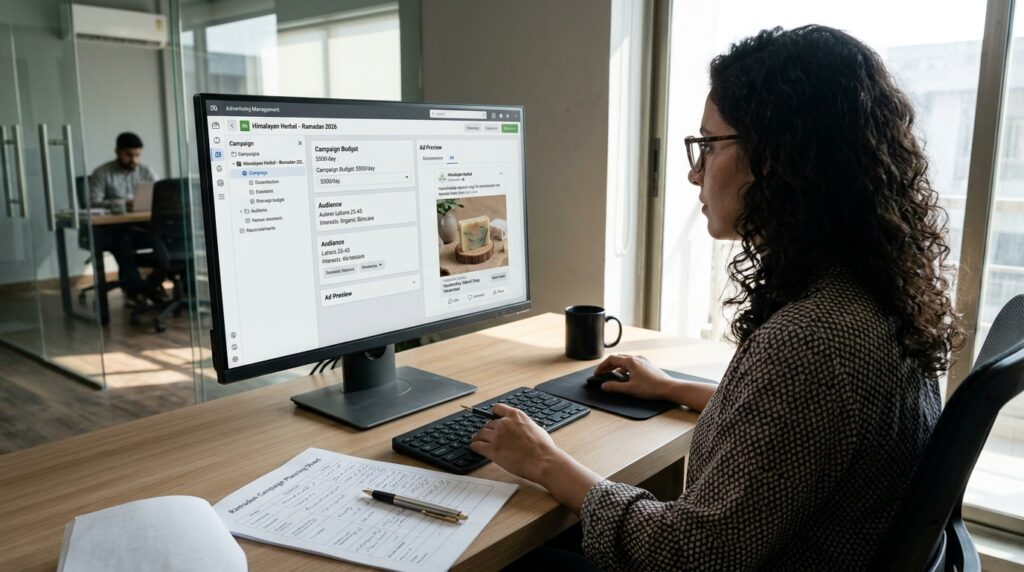
The advertisement should explain:
- What the business offers.
- Who the offer is for.
- Why customers should be interested.
- What action they should take.
Use clear images, professional videos, and a direct call to action.
Step 8: Configure the WhatsApp Conversation
Prepare the welcome message or suggested questions available in the campaign setup.
For example, a customer interested in a furniture advertisement might see options such as:
- What are the available prices?
- Do you offer delivery?
- What colors are available?
- Can I see the complete collection?
These options help customers begin conversations more easily.
Step 9: Review and Publish
Before publishing, check the following:
- Correct Facebook Page.
- Correct WhatsApp number.
- Campaign objective.
- Advertising budget.
- Target audience.
- Selected placements.
- Advertisement text.
- Images or videos.
- Call-to-action button.
- Opening message.
- Payment method.
After reviewing the settings, publish the campaign and monitor its delivery.
Best Marketing Strategies for Click-to-WhatsApp Ads
Creating an advertisement is only the first step. Businesses need a clear marketing strategy to attract the right audience and convert conversations into customers.
The following strategies can help improve campaign performance.
Promote One Clear Offer
Avoid trying to advertise multiple unrelated products or services in one campaign.
A focused offer makes it easier for customers to understand what the business provides.
For example, a beauty salon can create separate campaigns for hair treatments, skincare services, and bridal packages.
Each advertisement should have a specific message and a relevant WhatsApp conversation flow.
Use Strong Call-to-Action Messages
A call to action tells potential customers what to do after seeing the advertisement.
Effective examples include:
- Message Us for Pricing.
- Chat With Our Team.
- Get a Free Quote.
- Ask About Available Packages.
- Book Your Consultation.
- Explore Our Latest Collection.
The call to action should match the actual offer and the conversation customers will receive.
Create Engaging Video Advertisements
Video can help businesses demonstrate products and services more effectively than text alone.
For example:
- A restaurant can show food preparation and popular dishes.
- A clothing brand can present its latest collection.
- A travel agency can showcase destinations.
- A real estate company can provide property walkthroughs.
- A fitness studio can demonstrate training sessions.
Keep videos focused and make the main offer clear in the opening seconds.
Use High-Quality Images
Visual quality plays an important role in advertising performance.
Use professional product photographs, service images, and graphics that clearly communicate the offer.
Avoid overcrowded designs, excessive text, and low-resolution images.
Target Relevant Audiences
The objective should be to attract potential customers rather than simply generate a large number of conversations.
For example, a company selling premium furniture should focus on audiences likely to purchase its products instead of targeting everyone.
Test different audience groups and compare the quality of the inquiries they generate.
Offer Something Valuable
Give customers a clear reason to start a conversation.
Possible offers include:
- Free consultations.
- Product demonstrations.
- Price quotations.
- Special packages.
- New customer discounts.
- Personalized recommendations.
- Product availability information.
The offer should be relevant to the audience and commercially realistic.
Respond Quickly to Customer Messages
Fast responses can improve the customer experience and prevent potential buyers from losing interest.
When someone clicks an advertisement, they may also be contacting competing businesses.
A delayed response can reduce the chance of converting an interested customer.
Businesses should arrange coverage during campaign hours and use appropriate automated greetings when staff are unavailable.
Retarget Interested Customers
Businesses may use eligible retargeting options to reach people who have previously interacted with their brand.
Depending on available tools and customer consent, audiences may include:
- Website visitors.
- People who engaged with social media content.
- Previous customers.
- People who interacted with earlier advertisements.
- Eligible customer lists.
Retargeting can help businesses reconnect with people who already know their products or services.
Test Different Advertisement Creatives
Do not assume that the first advertisement will produce the best results.
Test different:
- Headlines.
- Images.
- Videos.
- Offers.
- Calls to action.
- Audience groups.
- Opening messages.
Compare the results and gradually increase spending on the combinations that produce qualified inquiries.
Click-to-WhatsApp Ad Examples for Different Businesses
Different industries can use WhatsApp advertising in different ways.
The following examples demonstrate how businesses can structure campaigns around their customers’ needs.
E-Commerce Businesses
An online store can advertise new products, seasonal offers, and special collections.
Example advertisement:
“Discover Our Latest Summer Collection! Looking for new styles? Message us on WhatsApp to explore available designs, sizes, and prices.”
When a customer clicks the advertisement, the business can provide product information and help them complete an order.
Real Estate Agencies
Real estate companies can use WhatsApp ads to generate inquiries about available properties.
Example advertisement:
“Looking for Your Next Home? Explore available apartments and houses in your preferred location. Message our team on WhatsApp for property details and viewing options.”
The sales team can ask about location, budget, property size, and purchase requirements.
Travel Agencies
Travel companies can promote holiday packages, tour plans, and travel consultations.
Example advertisement:
“Planning Your Next Holiday? Discover exciting travel packages and get information about destinations, accommodation, and pricing. Chat with our travel team today.”
The WhatsApp conversation can help identify the customer’s destination, travel dates, and budget.
Educational Institutions
Schools, colleges, and training providers can advertise courses, admissions, and educational programs.
Example advertisement:
“Interested in Our Professional Courses? Message us on WhatsApp to learn about course details, admission requirements, schedules, and fees.”
This approach can help admissions teams answer questions and collect student inquiries.
Restaurants and Food Businesses
Restaurants can advertise special menus, new dishes, and meal packages.
Example advertisement:
“Explore Our New Menu! Message us on WhatsApp to discover today’s specials, available meals, and ordering options.”
Depending on the business setup, customers can continue to place orders or request assistance.
Beauty and Wellness Businesses
Salons, spas, and wellness centers can promote services and appointment availability.
Example advertisement:
“Ready for a Fresh Look? Explore our latest beauty services and message us on WhatsApp to ask about packages and available appointments.”
The business can use the conversation to understand customer preferences and arrange bookings.
How to Create Effective WhatsApp Ad Messages
The first message a customer sees after clicking an advertisement can influence whether they continue the conversation.
A confusing or overly complicated opening experience may discourage potential customers.
Write a Clear Welcome Message
A welcome message should acknowledge the customer’s inquiry and explain how the business can help.
For example:
“Hello! Thank you for contacting us. We are happy to help you explore our products. What would you like to know today?”
Use Suggested Questions
Suggested questions make it easier for customers to start a conversation.
For example, an online store might provide:
- Product prices.
- Available sizes.
- Delivery information.
- Payment options.
This reduces unnecessary back-and-forth communication.
Avoid Asking Too Many Questions
Do not make the customer complete a long questionnaire before receiving basic information.
Ask only the details needed to understand the inquiry.
Personalize Customer Conversations
Use customer information and conversation context to provide relevant answers.
For example, if someone asks about a specific product, provide information about that product instead of sending a generic company introduction.
Provide a Clear Next Step
Every conversation should help the customer move toward a useful outcome.
Possible next steps include:
- Requesting a quotation.
- Booking an appointment.
- Viewing a product.
- Speaking with a representative.
- Completing an order.
WhatsApp Chatbots and Automation for Advertising Campaigns
Businesses receiving many inquiries through Click-to-WhatsApp ads may find it difficult to manage every conversation manually.
Chatbots and automation tools can help organize customer communication and reduce repetitive work.
Automated Welcome Messages
A chatbot can greet customers immediately after they send a message.
It can introduce the business and provide options for common inquiries.
Lead Qualification
A chatbot can ask a few relevant questions to understand whether a customer is a suitable lead.
For example, a real estate chatbot might ask:
- Which location are you interested in?
- What is your approximate budget?
- Are you looking to buy or rent?
- What type of property do you need?
The answers can help sales representatives prioritize inquiries.
Automated Product Information
E-commerce businesses can use chatbots to provide product information, availability details, and frequently asked questions.
This can reduce the workload of customer support teams.
Human Agent Handover
Not every customer request should be handled by automation.

Businesses should provide a clear way for customers to speak with a human representative when they need personalized assistance.
CRM Integration
Connecting WhatsApp conversations to a CRM system can help businesses organize leads, track sales opportunities, and maintain customer records.
It can also help sales teams understand where each inquiry came from and what action is required.
How to Track Click-to-WhatsApp Advertising Performance
Running advertisements without tracking their performance makes it difficult to understand whether the investment is producing valuable results.
Businesses should monitor more than the number of clicks or conversations.
Conversations Started
This metric measures how many conversations are attributed to the advertisement.
It helps businesses understand whether their creative and audience are encouraging people to contact them.
Cost Per Conversation
Cost per conversation measures the advertising spend required to generate an attributed WhatsApp conversation.
Formula:
Cost Per Conversation = Advertising Spend ÷ Conversations Started
Qualified Leads
A qualified lead is someone who has genuine interest and meets the business’s basic customer requirements.
For example, a travel agency may consider a customer qualified when they have a destination, travel date, and realistic budget.
Cost Per Qualified Lead
This metric measures how much the business spends to generate one qualified lead.
Formula:
Cost Per Qualified Lead = Advertising Spend ÷ Qualified Leads
Conversion Rate
Conversion rate measures how many interested customers complete a desired action.
This could be a purchase, appointment, booking, or consultation.
Formula:
Conversion Rate = Conversions ÷ Qualified Leads × 100
Return on Ad Spend
Return on ad spend measures the revenue generated from advertising relative to the advertising expenditure.
Formula:
ROAS = Revenue Attributed to Ads ÷ Advertising Spend
For example, if a business spends $500 and generates $2,000 in attributable revenue, its ROAS is 4.
This means the business generates $4 in revenue for every $1 spent on advertising. It does not mean the business earns $4 in profit, because product costs and other expenses must also be considered.
Important Advertising Metrics
| Metric | What It Measures |
|---|---|
| Impressions | Number of times an advertisement is displayed |
| Reach | Number of people who see the advertisement |
| Link clicks | Clicks on the advertisement’s link or destination |
| Conversations started | Attributed messaging conversations |
| Cost per conversation | Average advertising cost per conversation |
| Qualified leads | Inquiries that meet business requirements |
| Conversion rate | Percentage of leads completing a desired action |
| ROAS | Revenue generated relative to advertising spend |
Businesses should use a CRM, organized lead records, or suitable tracking tools to connect conversations with actual sales.
Common Mistakes to Avoid When Running Click-to-WhatsApp Ads
A campaign can receive clicks and conversations without generating profitable business results.
The following mistakes can reduce advertising performance.
Targeting the Wrong Audience
An advertisement may attract many people who are not interested in the product or cannot afford the service.
Use relevant audience targeting and evaluate lead quality rather than focusing only on reach.
Using Unclear Advertisement Messages
Customers should understand what the business offers before clicking the advertisement.
Avoid vague headlines and confusing promotional content.
Ignoring Customer Messages
A campaign can generate valuable inquiries, but delayed responses may cause potential customers to contact competitors.
Make sure someone is available to handle conversations during advertising hours.
Sending Generic Replies
Customers expect relevant information about the product or service they asked about.
Prepare useful responses instead of sending the same unrelated message to every inquiry.
Spending Too Much Before Testing
Starting with a large budget can create unnecessary risk.
Test different creatives and audiences first, then increase spending when you have reliable performance data.
Measuring Only Conversations
A large number of conversations does not necessarily mean a successful campaign.
Measure qualified leads, bookings, purchases, and revenue.
Failing to Follow Up
Some customers need more time before making a purchasing decision.
Use appropriate follow-up communication when customers have agreed to receive it and the messaging rules allow it.
Not Monitoring Campaign Quality
Review advertising feedback, message quality, customer complaints, and campaign performance regularly.
Poor customer experiences can damage the business’s reputation and reduce campaign effectiveness.
Click-to-WhatsApp Ads vs. Website Conversion Ads
Both advertising approaches can generate customers, but they provide different experiences.
| Feature | Click-to-WhatsApp Ads | Website Conversion Ads |
|---|---|---|
| Destination | WhatsApp conversation | Website or landing page |
| Customer interaction | Direct messaging | Website browsing or form submission |
| Lead collection | Through chat | Through forms or website actions |
| Sales assistance | Conversation with a representative | Website information and checkout |
| Personalization | Individual conversations | Website-based personalization |
| Customer questions | Can be answered directly | May require a separate contact option |
| Best for | Conversation-based sales | Online purchases and website actions |
Click-to-WhatsApp ads are particularly useful when customers need assistance before making a decision.
Website conversion ads may be more suitable when a business has a well-developed online store or a simple checkout process.
Some companies use both approaches as part of a broader advertising strategy.
Best Practices for Successful Click-to-WhatsApp Campaigns
A successful campaign requires a combination of clear advertising, relevant targeting, fast communication, and effective sales management.
Businesses should follow these practices:
- Promote one clear offer in each advertisement.
- Use professional images and videos.
- Write headlines that explain the customer benefit.
- Select relevant geographic and audience settings.
- Provide a simple WhatsApp conversation experience.
- Respond to new inquiries as quickly as possible.
- Use chatbots for repetitive questions where appropriate.
- Transfer complex inquiries to human representatives.
- Track qualified leads and completed sales.
- Test different creative variations.
- Review campaign performance regularly.
- Adjust spending based on business results.
- Respect customer preferences and applicable messaging rules.
Are Click-to-WhatsApp Ads Worth the Investment?
Click-to-WhatsApp ads can be a valuable marketing option for businesses that depend on direct customer conversations.
They can reduce the distance between discovering a product and contacting the seller. Customers can ask questions, request prices, compare options, and receive personalized assistance without leaving their messaging application.
They are particularly useful for:
- Businesses selling products that require explanation.
- Companies offering consultations.
- Real estate agencies.
- Travel and tourism businesses.
- Educational institutions.
- Local service providers.
- E-commerce companies.
- Appointment-based businesses.
However, results depend on the quality of the advertisement, the relevance of the audience, the business’s offer, and how effectively inquiries are handled.
A campaign that generates inexpensive conversations may still perform poorly if those conversations do not lead to purchases.
Businesses should therefore evaluate advertising performance using qualified leads, conversions, revenue, and profitability rather than conversation volume alone.
Frequently Asked Questions About Click-to-WhatsApp Ads
What are Click-to-WhatsApp ads?
Click-to-WhatsApp ads are paid advertisements that allow users to start a WhatsApp conversation with a business after clicking an advertisement, commonly displayed on Facebook or Instagram.
How much do Click-to-WhatsApp ads cost?
There is no fixed advertising price. Costs depend on the campaign budget, audience, location, industry, competition, creative quality, and campaign objective. Businesses can start with a small testing budget and increase spending when they identify profitable campaigns.
Are Click-to-WhatsApp ads free?
No. Businesses generally pay for advertisement delivery through Meta’s advertising system. Additional WhatsApp Business Platform messaging or provider fees may apply depending on the account setup and applicable pricing rules.
Do I need WhatsApp Business to run Click-to-WhatsApp ads?
Businesses generally need a WhatsApp Business account or an eligible connected business messaging setup. A WhatsApp Business App account may be sufficient for smaller businesses, while the WhatsApp Business Platform supports more advanced integrations and automation.
Can I run Click-to-WhatsApp ads on Instagram?
Yes. Eligible Instagram advertising placements can support advertisements that direct customers to a WhatsApp conversation, depending on account settings and campaign availability.
Can I run WhatsApp ads without a website?
Yes. A website is not necessarily required for a Click-to-WhatsApp campaign. Customers can be directed straight into a WhatsApp conversation, where the business can provide information and handle inquiries.
What is a good daily budget for Click-to-WhatsApp ads?
The appropriate daily budget depends on the business, target market, and advertising goals. A small business may begin with $5–$10 per day as an initial test, then adjust the budget according to qualified leads and sales. These amounts are starting examples, not guaranteed performance recommendations.
How do I reduce the cost per WhatsApp conversation?
Businesses can test different creatives, improve audience relevance, promote clear offers, and make the opening conversation easier. They should also review campaign performance and focus on attracting people who are genuinely interested in the product or service.
Can I use a chatbot with Click-to-WhatsApp ads?
Yes. Businesses using suitable WhatsApp automation solutions can connect chatbot workflows to customer conversations. Chatbots can answer common questions, collect lead information, and transfer more complicated requests to human representatives.
How quickly should I respond to WhatsApp ad inquiries?
Businesses should aim to respond as quickly as possible during campaign hours. Fast responses improve the customer experience and can help prevent interested customers from losing attention or contacting another company.
What is the difference between cost per click and cost per conversation?
Cost per click measures the advertising cost associated with generating a click. Cost per conversation measures the cost of generating an attributed WhatsApp conversation. A person can click an advertisement without completing a conversation, so these metrics are not interchangeable.
Can Click-to-WhatsApp ads generate sales?
Yes. Businesses can use these advertisements to start sales conversations, answer customer questions, provide quotations, and guide potential customers toward purchases. Actual sales depend on the offer, audience quality, pricing, customer service, and sales process.
How can I track sales generated through WhatsApp ads?
Businesses can use campaign reporting, CRM records, lead labels, unique campaign identifiers, and sales tracking processes to connect inquiries with purchases. More advanced integrations can send eligible conversion information back to advertising systems.
What industries benefit most from Click-to-WhatsApp advertising?
Real estate, travel, education, retail, beauty, professional services, and e-commerce businesses can benefit when customers prefer asking questions before purchasing or booking.
Conclusion
Click-to-WhatsApp ads provide businesses with a direct way to connect advertising campaigns with customer conversations. Instead of sending potential customers to a website or traditional contact form, businesses can invite them to ask questions, explore products, request quotations, and discuss services through WhatsApp.
The total cost depends on the advertising budget, audience competition, campaign performance, and any applicable messaging or software charges. Businesses should understand these costs before launching a campaign and avoid treating advertising spend as the only expense.
For better results, focus on clear offers, relevant audience targeting, professional creative content, fast customer responses, and effective lead management. Track qualified inquiries, conversions, and revenue rather than measuring success through clicks alone.
When supported by a strong marketing strategy and a well-managed customer communication process, Click-to-WhatsApp ads can become an effective channel for generating leads, building customer relationships, and growing business sales.